Device Auditing
Device Auditing is the normal starting point for understanding a managed endpoint. Use it to read current inventory, online state, role health, software, patches, services, sessions, activity history, and device-specific operational tabs.
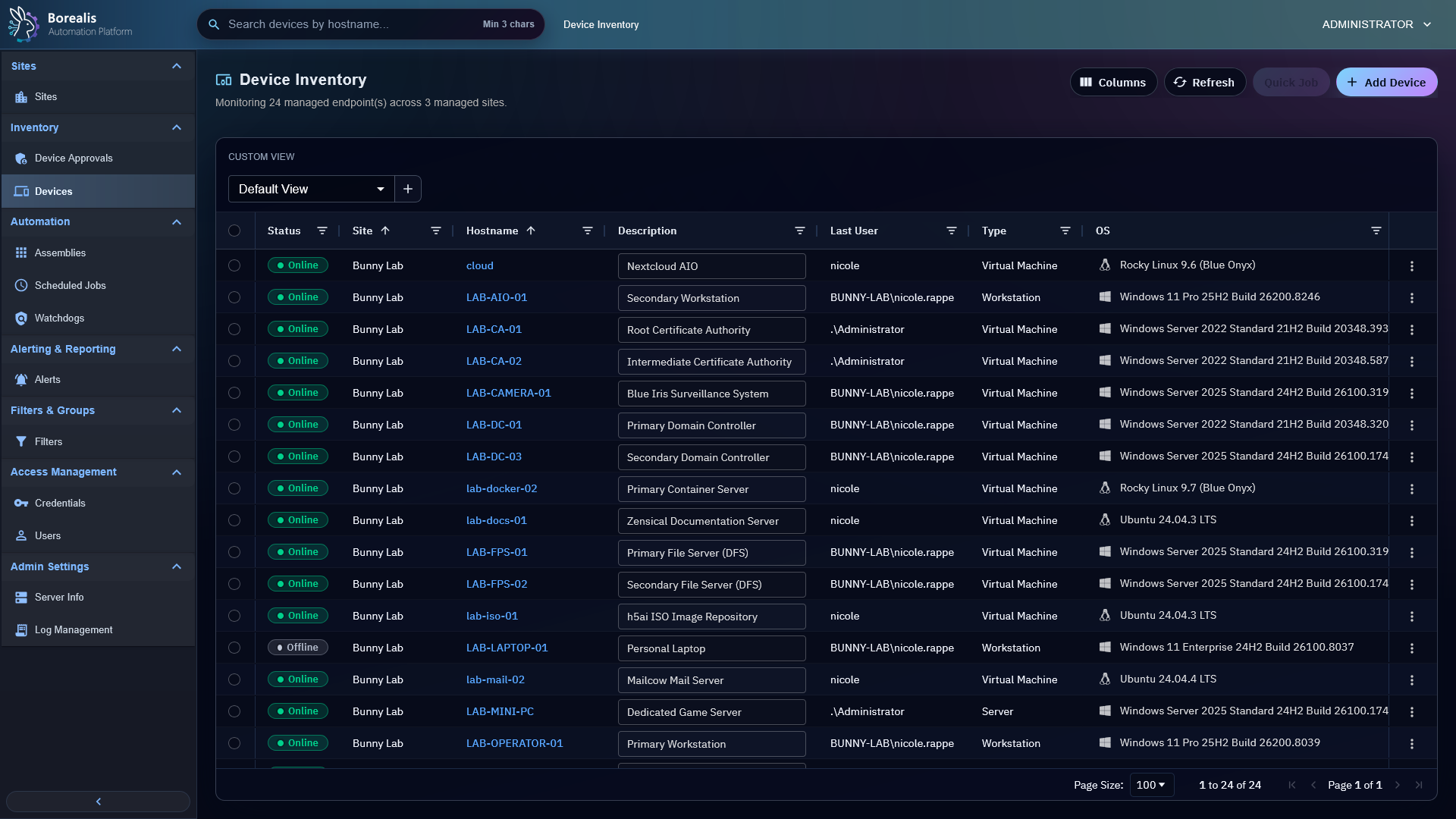
Open Device Inventory
- Open
Inventory > Devices. - Search or filter by hostname, site, connection status, user, type, or operating system.
- Select a device hostname to open Device Summary.
- Use saved table views when you need repeatable columns and filters for routine audits.
- Open
Columnsto add grouped inventory fields or defined Metadata Fields to the table when those values matter for reporting. - Select one or more Agent devices, then use
Update Agentto queue current Engine-built artifact when endpoints need refresh.
Read Device Summary
Device Summary collects the last-known inventory and action tabs for one endpoint.
Device Summaryshows high-level identity, OS, hardware, network, current user, uptime, and description.- Storage usage warnings ignore
CD-ROMdrives so optical media does not count as disk pressure. Installed Softwareshows software inventory and software actions.Patch Managementshows pending and installed Windows patch inventory and can open Scheduled Job drafts for ad-hoc Windows update installs.Services,Processes,File Management,Registry,Remote Shell, andRemote Desktopare live operations tabs.Agent Updatesunder Backend Tools starts install-equivalent Agent repair and shows live or historical update timeline, status, duration, failure detail, and Scheduled Job links beside full-height history grid.Activity Historyshows quick job and automation output tied to the device, with scheduled-job activity names linking back to the job history and task timelines showing start, finish, and compact duration.Watchdogsshows active incidents, effective watchdog assignments, and device-level suppressions.- Expanded
Agent Healthstays at the top of the Device Summary sidebar. OpenAgent Connectionfor API WebSocket, heartbeat, and secure-tunnel status; openRolesfor runtime-role status. - Colored glyphs provide compact health state. Hover any connection or role for curated details and use its copy button, or use the copy button beside
Agent ConnectionorRolesto copy the full subsection.
Understand Status
Connectedmeans the Engine saw a recent heartbeat and the site worker reports the Agent management socket is connected.Disconnectedmeans the Engine saw a recent heartbeat, but the site-worker management connection is not healthy.Offlinemeans heartbeat age exceeded the online window.- Agent Health consolidates connection and role state without replacing Device List connection status.
- Stale inventory means the device may be online but a specific role has not published fresh data yet.
Tip
Start with the Device Summary sidebar's Agent Health section before opening logs. Most device-side issues show as stale heartbeat, failed role, missing helper readiness, or offline state.
Common Checks
- Device missing from normal inventory: verify it is approved and assigned to a site you can see.
- Wrong site: update site assignment from Sites or the device assignment flow.
- Software, patch, service, or process data stale: use the tab refresh action or wait for the next agent poll.
- Current-user automation unavailable: hover
Execution Context: Current Userunder Agent Health and check session inventory.
Update Agent
- Open
Backend Tools > Agent Updatesfrom Device Summary. - Select
Update Now. - Confirm service interruption. Borealis may restart Agent, UltraVNC, and WireGuard managed services. Native Windows RDP remains running unless its health path requires recovery.
- Keep Agent Updates open to follow live progress. Selecting historical row loads its timeline; Scheduled Job link opens authoritative run history.
Operator-requested updates perform install-equivalent repair even when installed binary already matches Engine artifact. Device identity, enrollment, trust, and Engine association stay preserved. Hourly checks remain non-disruptive when no newer artifact exists.
Detailed Codex Breakdown
API endpoints
GET /api/devices- device list scoped to operator site access.GET /api/devices/search?hostname=<query>- shared hostname search.GET /api/devices/<guid>- device summary by GUID.POST /api/devices/agent-maintenance- queue current Engine artifact update jobs for selected devices.GET /api/devices/<guid>/agent-updates?operation_id=<operation-id>&limit=<1-100>- load site-scoped Agent update history and active operation.POST /api/agent/update/progress- accept authenticated Agent progress events and correlate them with Scheduled Job history.POST /api/devices/<guid>/quarantine- admin containment action that blocks jobs and remote access without deleting inventory.POST /api/devices/<guid>/unquarantine- admin restore action for quarantined devices.POST /api/devices/<guid>/revoke- admin trust revocation that blocks token refresh and remote access.GET /api/device/details/<hostname>- detailed device payload.POST /api/agent/heartbeat- heartbeat, metrics, and metadata sync.POST /api/agent/status- startup timeline and role health update.POST /api/agent/details- full inventory payload.GET /api/device/activity/<hostname>- activity history.DELETE /api/device/activity/<hostname>- clear activity history.GET /api/device/patches/<hostname>- cached patch inventory for an in-scope device.POST /api/device/patches/<hostname>/refresh- request fresh patch inventory over the device SYSTEM socket.GET /api/device/registry/<hostname>/roots- Registry Editor roots view.GET /api/device/registry/<hostname>/children?path=<registry-path>- Registry Editor key view.
Related documentation
Source map
- Device APIs:
Data/Engine/Containers/api-backend/cmd/api-backend/devices.goand relateddevice_*Go files. - Device List UI:
Data/Engine/Containers/webui-frontend/data/web-interface/src/Devices/Device_List.jsx - Device Summary UI:
Data/Engine/Containers/webui-frontend/data/web-interface/src/Devices/Tabs/Device_Summary.jsx - Agent Updates UI:
Data/Engine/Containers/webui-frontend/data/web-interface/src/Devices/Tabs/Agent_Updates.jsx - Registry Editor UI:
Data/Engine/Containers/webui-frontend/data/web-interface/src/Devices/Tabs/Remote_Registry_Editor.jsx - Patch Management tab UI:
Data/Engine/Containers/webui-frontend/data/web-interface/src/Devices/Tabs/Patch_Management.jsx - Agent Health UI:
Data/Engine/Containers/webui-frontend/data/web-interface/src/Devices/Tabs/Agent_Health.jsx - Agent Health sidebar and tooltip UI:
Data/Engine/Containers/webui-frontend/data/web-interface/src/Devices/Tabs/Agent_Startup_Flow.jsxandData/Engine/Containers/webui-frontend/data/web-interface/src/Devices/Tabs/Device_Summary.jsx - Agent audit role:
Data/Agent/internal/roles/device_audit/ - Agent patch role:
Data/Agent/internal/roles/patch_management/
Runtime behavior
- Device List status is derived from
devices.last_seenplus the site-worker Agent socket registry exposed through/api/devicesasagent_socket. - Bulk
Update Agentposts selected Agent GUIDs to/api/devices/agent-maintenancewithaction=update_now, which createsagent_maintenancescheduled-job history and site-worker work items. - Canonical Agent Updates URL is
?tab=remote_ops&view=agent_updates;operation_iddeep-links one operation and is removed when operator leaves that workspace. - Agent update progress emits
agent_update_progress_changedthrough Go SSE. UI refetches on matching device events and retains active/idle polling fallback. GET /api/devicesenriches device rows by fetching each visible site worker's/agentssnapshot once, then matching system sockets by hostname, Agent ID, or GUID.- Site List drilldowns use
/devices?site=<site_id>&status=<connected|disconnected|offline>; Device List normalizes those status tokens toConnected,Disconnected, orOffline. - Heartbeat-only online state without a confirmed Agent socket renders as
Disconnected, notConnected. - Device Summary Agent Health merges the Agent-reported Engine Socket role into
API Websocket Connectionand the Agent-reported WireGuard role intoSecure Tunnel; those two signals do not repeat underRoles. - Secure Tunnel detail includes virtual IP, tunnel ID, and Agent ID as connection context rather than presenting identifiers as separate health checks.
- Heavy inventory lands through
/api/agent/details; heartbeat carries lightweight metrics and metadata deltas. - Session inventory includes helper readiness fields so current-user execution can distinguish a logged-in user from a helper-ready session.
- Software data is stored both in
devices.softwarefor UI detail anddevice_software_inventoryfor reliable filter matching. - Patch data is normalized into
device_patch_inventory; non-patch details payloads preserve existing patch rows. - Device-level patch install actions open Scheduled Job drafts with
job_kind=patch_install; the scheduler handles target history, execution, stdout/stderr capture, and timeout state. - Scheduled activity rows carry
metadata.scheduled_job_id; the activity API enriches rows withscheduled_job_name, andActivity_History.jsxlinks those rows to/jobs/<job_id>?tab=job_history. The Activity column sizes from the widest activity name within a 220-360px bound, row-spans adjacent rows from the same scheduled job occurrence, and reserves a compact 64px lane for Borealis-blue bezier connectors from the rendered activity label edge. Full labels remain available through the Activity tooltip, and the final output column absorbs spare grid width. Activity History regroups AG Grid's sorted row nodes byactivity_group_keyafter active column sorting so one activity remains one contiguous row-spanned block. The timeline renderer hides queue lane noise and combines started, finished, and compact duration data into one live-updating column for running activity. While running rows are visible, Activity History polls periodically to reconcile terminal or deleted rows that are changed from another page. Deleting a scheduled job or clearing/redeploying scheduled run records removes the linkedengine.activity_historyrows so stale running timers leave the device Activity History page.