File Management
File Management lets operators browse and change a device filesystem without opening a shell. Use it for remote upload, download, folder transfer, rename, move, delete, copy, paste, folder and text-file creation, and lightweight text edits.
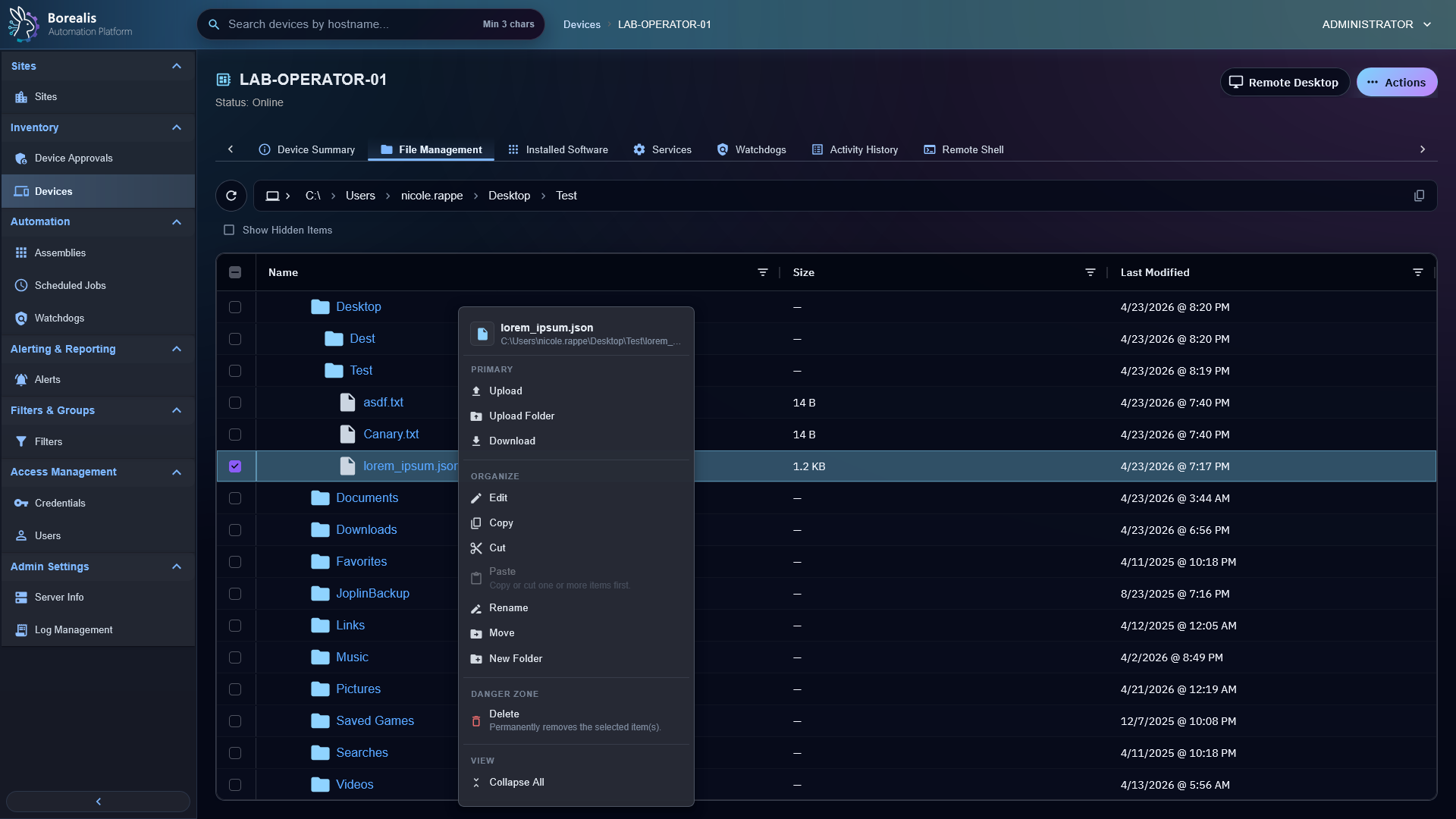
Browse Files
- Open a device.
- Open
File Management. - Select a drive or root.
- Expand folders or use the address bar.
- Toggle
Show Hidden Itemsonly when hidden paths are relevant.
The current working directory is URL-synced so refreshes and shared links can reopen the same folder.
Transfer Files
Uploadsends selected browser files to the current folder.Upload Folderpreserves relative paths from the browser folder picker.Downloadstages selected file or folder content on the Engine before the browser fetches it.Cancelasks the Agent to stop an active upload or download.
Duplicate uploads show a replace-or-skip decision before transfer begins.
Edit And Organize
- Right-click files or folders for contextual actions.
New Filecreates an empty text file in the current destination and opens it in the lightweight editor.- Text editing opens one remote INI, log, script, config, or other basic text file at a time. Successful saves close the editor and refresh the current file view.
- Copy and cut stay operator-local until paste asks the remote agent to perform the filesystem operation.
Warning
File actions run in the device service context: SYSTEM on Windows and root on Linux. Confirm path and selection before destructive actions.
Detailed Codex Breakdown
API endpoints
GET /api/device/files/<hostname>/roots- roots view.GET /api/device/files/<hostname>/children?path=<absolute-path>- list directory.POST /api/device/files/<hostname>/upload/conflicts- duplicate preflight.GET /api/device/files/<hostname>/text?path=<absolute-path>- read text file.POST /api/device/files/<hostname>/text- save text file.POST /api/device/files/<hostname>/mkdir- create directory.POST /api/device/files/<hostname>/rename- rename item.POST /api/device/files/<hostname>/move- move item.POST /api/device/files/<hostname>/paste- paste copied/cut items.POST /api/device/files/<hostname>/delete- delete items.POST /api/device/files/<hostname>/upload- start upload transfer.POST /api/device/files/<hostname>/download- start download transfer.GET /api/device/files/<hostname>/transfer/<transfer_id>/status- poll transfer.POST /api/device/files/<hostname>/transfer/<transfer_id>/cancel- cancel transfer.GET /api/device/files/<hostname>/transfer/<transfer_id>/content- fetch completed download artifact.
Related documentation
Source map
- File API:
Data/Engine/Containers/api-backend/cmd/api-backend/remote_files.go - Site-worker transfer runtime:
Data/Engine/Containers/site-worker/data/services/job_scheduler/worker_socket.py - Shared transfer store:
Data/Engine/Containers/site-worker/data/services/remote_files/transfers.py - File tab UI:
Data/Engine/Containers/webui-frontend/data/web-interface/src/Devices/Tabs/Remote_File_Management.jsx - Agent file role:
Data/Agent/internal/roles/file_management/
Runtime behavior
- Browse and mutations use the device SYSTEM Socket.IO channel through
file_management_request. - Large transfers use site-worker temp-file staging behind Go API proxy routes plus device-authenticated pull/push endpoints.
- Folder uploads use a manifest so nested paths do not need to fit in one socket payload.
- Transfer progress doubles as a cancellation checkpoint.
- Inline text editing uses
@uiw/react-codemirrorplus Borealis-owned CodeMirror extensions. Vite dedupes@codemirror/*packages and npm overrides@codemirror/stateso extensioninstanceofchecks do not fail when editor setup and app extensions load through different dependency paths.