Scheduled Jobs
Scheduled Jobs run saved automation now, once, or on a recurring cadence. Use them for routine script runs, workflow launches, Engine-side Ansible playbooks, agent maintenance, Windows patch installs, and local-network onboarding.
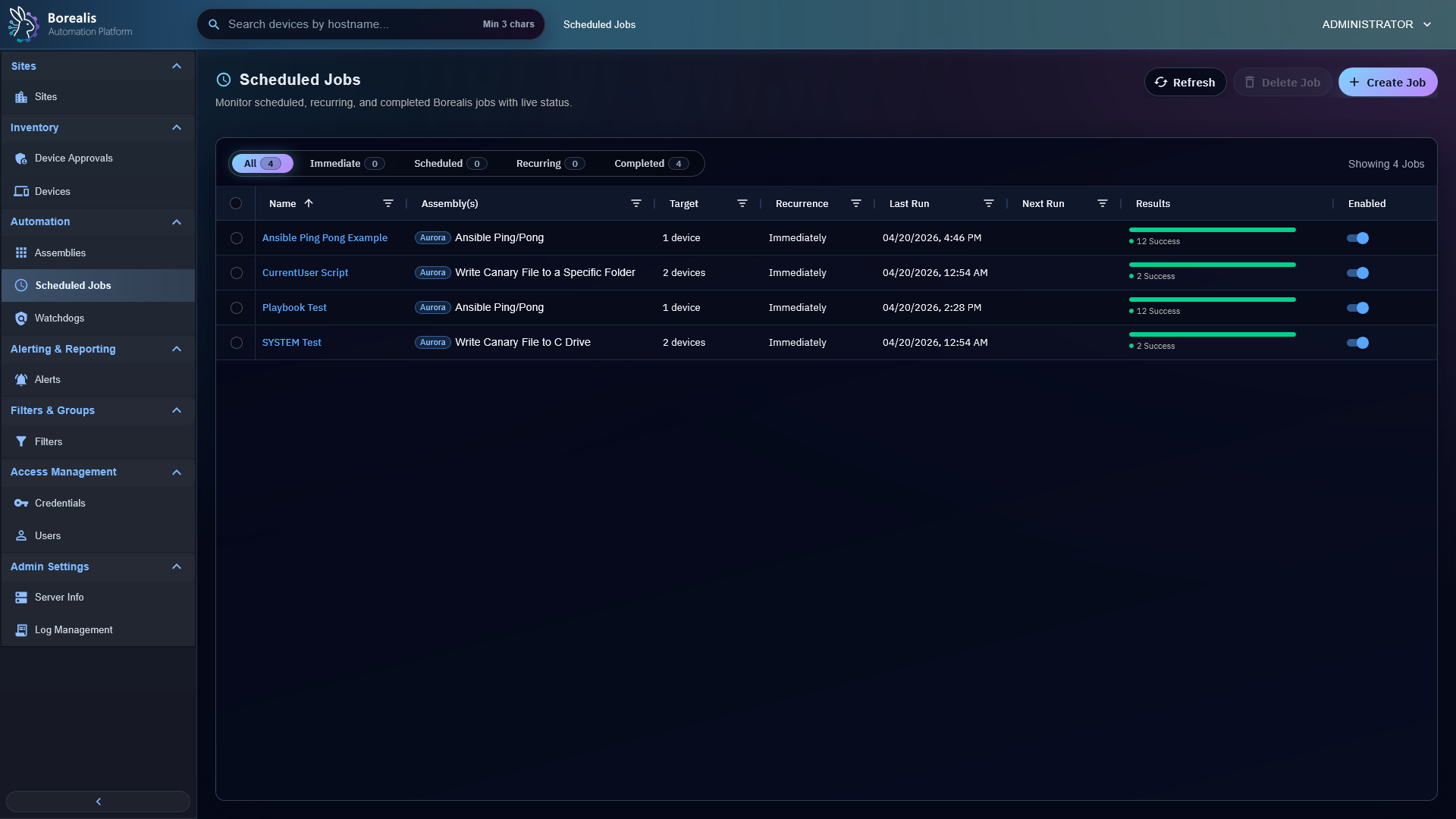
Create Job
- Open
Automation > Scheduled Jobs. - Select
New Job. - Name the job.
- Add one or more compatible assemblies.
- Choose targets: devices or filters.
- Choose schedule.
- Choose execution context when needed.
- Save.
Script jobs can target SYSTEM or current user. Ansible jobs target SSH or WinRM. Workflow jobs use the workflow's own runtime model and ignore scheduler-level targets/context. Patch Management opens this page on the Schedule tab with the selected KB, trigger type, targets, and return path already filled when operators schedule an ad-hoc Windows update install. Bulk patch installs use this page for shared timing, then create one scheduled job per selected patch.
Patch policies also create scheduled jobs, but operators configure them from Automation > Patch Management, then the Windows tab and Patch Management Policies inner tab. Each policy run creates one Patch Management job per approved KB/update identity so normal job history and per-device progress stay preserved.
Choose Schedule
Common schedule types include immediate, once, every 5/10/15/30 minutes, hourly, daily, weekly, monthly, and yearly.
Scheduled wall-clock times use the Engine host timezone. If the Engine host is configured for America/Denver, a daily job set for 12:00 AM runs at midnight in that timezone even when an operator browser or API client is in another timezone.
Read Results
- Current Run shows live or latest run state.
- Historical Runs groups past occurrences.
- Current Run and selected dated-run tabs place
Not StartedandStartedFilter Sliders above the device grid. Counts update with live device status, only one status can be selected across both sliders, and selecting the active status again returns to all devices. Not Startedcontains Pending, Expired, and Skipped.Startedcontains Running, Failed, Warning, and Success. Connection probes count as Running, while timeouts count as Failed.- Device rows show target status, output, errors, and skipped reasons.
- SSH and WinRM playbook rows show
Establishing Connection (ns)while Engine checks WireGuard and target-port readiness. Countdown survives page navigation because probe deadline lives with run history. - Ansible playbooks store per-target or shared recap output depending on execution mode.
- Patch install jobs store per-device install result, timeout or failure state, WUA result codes, reboot-required flags, and available Windows Update stdout/stderr detail.
The job list opens on the Normal filter so operator-created automation and onboarding jobs stay separate from internal maintenance and patch-install noise. Use Maintenance to audit internal Agent or Engine maintenance jobs, and use Patch Management to review Windows patch-install jobs created from Patch Management. Immediate, Scheduled, Recurring, and Completed narrow normal jobs only.
Onboarding Jobs
Sites can launch local-network onboarding jobs that appear in Scheduled Jobs. They use discovery scope, exclusions, stored credentials, platform selection, remote ports, and concurrency limits. Successful install still requires Device Approval.
Tip
Use filters for recurring jobs when membership should change as inventory changes. Use explicit devices when target list must stay obvious and small.
Detailed Codex Breakdown
API endpoints
GET /api/scheduled_jobs- list visible jobs.POST /api/scheduled_jobs- create job.GET /api/scheduled_jobs/<job_id>- get job.PUT /api/scheduled_jobs/<job_id>- update job.POST /api/scheduled_jobs/<job_id>/toggle- enable or disable.POST /api/scheduled_jobs/<job_id>/rerun- queue immediate occurrence from saved config.DELETE /api/scheduled_jobs/<job_id>- delete job.GET /api/scheduled_jobs/<job_id>/runs- run history.GET /api/scheduled_jobs/<job_id>/devices- device results.DELETE /api/scheduled_jobs/<job_id>/runs- clear run history.POST /api/onboarding/jobs/<job_id>/redeploy- rerun onboarding from saved config.GET /api/onboarding/jobs/<job_id>/targets- onboarding target details and approval context.
Related documentation
Source map
- API:
Data/Engine/Containers/api-backend/cmd/api-backend/scheduled_jobs*.go - Scheduler queue and tick manager:
Data/Engine/Containers/api-backend/cmd/api-backend/scheduler_manager.go - Scheduled script/Ansible dispatch:
Data/Engine/Containers/api-backend/cmd/api-backend/scheduler_execution.go - Site worker runtime:
Data/Engine/Containers/site-worker/data/services/job_scheduler/worker.py - UI:
Data/Engine/Containers/webui-frontend/data/web-interface/src/Scheduling/
Runtime behavior
job-schedulerowns scheduled ticks, queue leases, service-action queueing, and K3s site-worker reconciliation. K3s workload/site-worker lifecycle goes throughborealis-operator; WireGuard reconcile goes through the mounted tunnel control socket. Docker/Compose helper execution is retired after Stage 11.- Quick Job creation stores Assembly
domainanddomainLabelbeside Assembly GUID in scheduled component JSON. Scheduled Job source badges use current catalog provenance first, saved component provenance second, andUnknownonly when neither source exists; missing provenance must never implyUser-Created. job_kind=patch_installstores a singlepatch_installcomponent, uses system execution context, and bypasses assembly credential selection.- New Patch Management drafts expose only the
Scheduletab inCreate_Job.jsx; Patch Management supplies job name, patch component, target list, and system execution context. - New Patch Management drafts include an internal
return_toroute so successful creation returns to the originating fleet or device Patch Management page. - Bulk Patch Management drafts never store multiple KBs in one job.
Create_Job.jsxloops over selected patch items and creates onejob_kind=patch_installscheduled job for each patch using the same schedule/duration payload. - Schedule create/update accepts offsetless wall-clock values such as
2026-06-25T00:00as Engine-local time. Offset-bearing RFC3339 values remain absolute instants. - Daily, weekly, monthly, and yearly recurrence preserves Engine-local wall-clock time across daylight saving changes.
- Site workers execute site-scoped pressure work outside
api-backend. - Each due occurrence resolves targets once and freezes membership in run target rows.
- Filter targets preserve allowed site scope from creation/edit time.
- Remote SSH/WinRM Ansible requires active WireGuard peer IP and selected credential or service account path.
- SSH/WinRM admission uses 60-second readiness window. Scheduler persists
Establishing Connectionon run andestablishing_connectionon target rows before probe.updated_atanchors APIconnection_probe_deadline_ts;Create_Job.jsxderives one-second countdown after reload or tab navigation. - Job History current and selected dated-run tabs render one shared status-filter state through two Filter Sliders. Slider counts derive from current device rows, update with polling/realtime refresh, and filter AG Grid without changing Historical Runs summary list. AG Grid consumes remaining tab height; no status ReactFlow canvas remains.
- Individual execution probes independently, so ready devices dispatch without waiting for unrelated target timeout. Shared execution waits for batch admission, excludes timed-out targets, then dispatches eligible inventory.
- Patch install occurrences freeze target membership, queue
patch_install_runwork items, then call the site worker host-service bridge so the Agent SYSTEM socket performs WUA install work. - Patch policy evaluation runs from the scheduler manager before normal scheduled-job ticks. Due policies create immediate
job_kind=patch_installjobs withtrigger=policy,policy_id, andpolicy_run_idin the patch component. - Policy-created patch jobs still use regular scheduled-job run history, target rows, activity output, and progress metadata. Operators review them through the Scheduled Jobs
Patch Managementfilter. - Device Summary and Device Inventory Agent update actions create
job_kind=agent_maintenancejobs so operators can audit queued Agent maintenance from theMaintenancefilter. - Changed-build hourly Agent checks create disabled
job_kind=agent_maintenancerecords only after Agent detects newer Engine artifact. Same-build hourly checks create no job and restart no services. - Agent update runs remain active until Agent reconnects and reports required post-update role health. Scheduler marks non-terminal runs
Timed OutafterBOREALIS_AGENT_UPDATE_TIMEOUT_SECONDS(default 900). Device Summary Agent Updates links each operation to?tab=job_history. Scheduled_Jobs_List.jsxdefaults to theNormalfilter. Normal, Immediate, Scheduled, Recurring, and Completed excludeagent_maintenanceandpatch_installjob kinds.Maintenanceincludes Agent maintenance and future job-kind names with a standalonemaintenancetoken.Patch Managementincludes patch job-kind names such aspatch_install.