Remote Desktop
Remote Desktop opens Windows endpoint in browser through Borealis-managed WireGuard and Apache Guacamole. UltraVNC remains default protocol. Windows RDP provides native alternative when endpoint and credential support it.
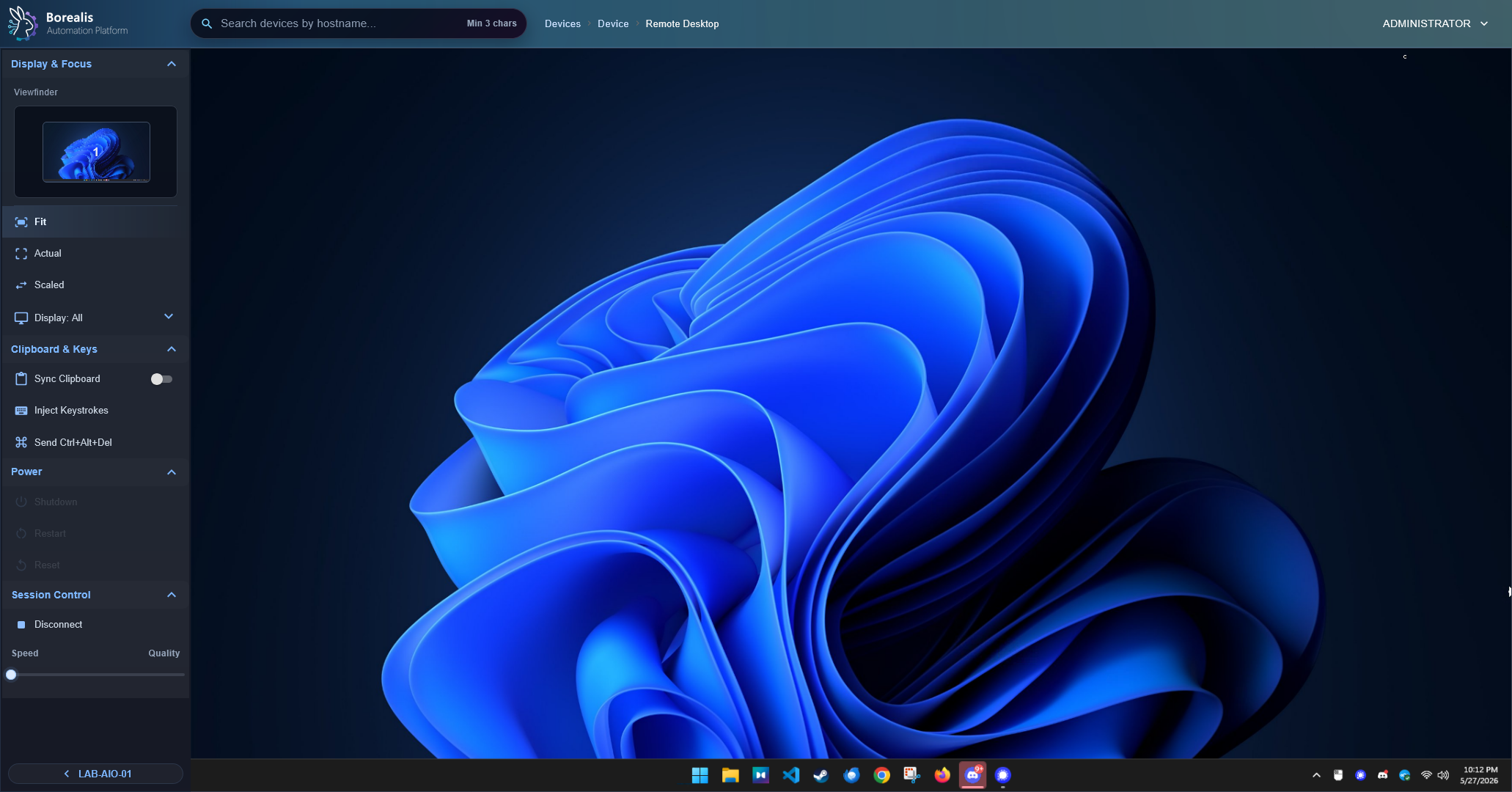
Launch Session
- Open a Windows device.
- Open
Remote Desktop. - Under
Session Control, chooseUltraVNCorWindows RDP. UltraVNC is selected by default. - Select launch action.
- For Windows RDP, select eligible stored Windows credential or enter username, password, and optional domain for current session.
- Wait for readiness checks.
- Work in browser viewer.
UltraVNC keeps shared collaboration behavior. Windows RDP creates separate native RDP session.
Info
Slower endpoints can spend extra time on Authenticating Session while the Agent finishes service and listener checks. Borealis allows up to 60 seconds for Agent readiness and 75 seconds for complete browser setup so underpowered virtual machines have time to become ready.
Use Session Controls
- Reconnect if the browser stream drops after it was already ready.
- Choose
Prefer SpeedorPrefer Qualitywhen bandwidth or visual fidelity matters. For RDP, speed uses lower color depth and disables Windows visual effects; quality uses lossless full-color rendering and enables wallpaper, themes, font smoothing, full-window dragging, desktop composition, and menu animations. Changing preference reconnects desktop stream so Guacamole can apply complete profile. - Use the always-open display selector or the viewfinder to fit the full desktop or focus one monitor when the Windows endpoint has multiple displays.
- After a display is selected, Borealis switches the viewer to
Fit, clips video and mouse input to that display, and previews that display region by itself. The viewfinder center-fits multi-display layouts so wide monitor spans stay inside the sidebar preview. - Use
FitorScaledwhenDisplay: Allis selected. Single-display focus usesFitonly. - Use Ctrl+Alt+Del from session controls when Windows secure desktop needs it.
- Disconnect when finished. Closing the browser leaves a short reconnect window.
Availability Rules
- Remote Desktop needs a supported Windows agent.
- Agent must be online with WireGuard plus selected VNC or RDP role healthy.
guacdmust be available on the Engine.- Browser traffic stays same-origin under Borealis HTTPS; no separate public VNC or RDP endpoint is used.
- Windows RDP requires supported Windows edition and account allowed to sign in through Remote Desktop. Borealis does not add users to
Remote Desktop UsersorAdministrators, and does not change Group Policy. - Stored RDP credentials must use
WindowsorWinRMconnection type,MachineorDomaincredential type, username, and password. Site-scoped credentials appear only for matching device site; global credentials appear for all sites.
Info
New RDP sessions request current browser viewer resolution and track later viewer-size changes. Borealis does not yet enumerate or select existing Windows Remote Desktop Services sessions. Windows decides whether supplied account resumes existing session, and viewport update may resize resumed session. Multi-user terminal-server session selection remains unsupported.
Warning
Do not expose endpoint VNC or RDP listeners directly. Borealis keeps remote desktop traffic behind managed WireGuard reachability, site-worker routing, and same-origin Guacamole browser proxying.
Windows RDP role enables TermService and native Remote Desktop setting. It creates only Borealis - RDP - WireGuard: inbound TCP 3389 scoped to Agent WireGuard /32 as local address and Engine WireGuard /32 as remote address. It preserves unrelated firewall rules.
Tip
If Remote Desktop is unavailable, check Device Summary Agent Health first, then Server Info for remote-desktop-guacd health.
Detailed Codex Breakdown
API endpoints
GET /api/vnc/viewers- report Guacamole availability.POST /api/vnc/establish- establish VNC or RDP session selected byprotocol; omitted protocol defaults tovnc.POST /api/vnc/disconnect- leave or close selected protocol session.POST /api/vnc/handoff- reassign session-owner metadata.GET /api/vnc/sessions- list active sessions.POST /api/agent/vnc/ensure- agent readiness and session metadata.POST /api/agent/rdp/ensure- Agent-authenticated RDP WireGuard scope and role readiness.
Related documentation
Source map
- Remote Desktop UI:
Data/Engine/Containers/webui-frontend/data/web-interface/src/Devices/Tabs/Remote_Desktop.jsx - Remote Desktop API routing:
Data/Engine/Containers/api-backend/cmd/api-backend/vnc_runtime.go - RDP session broker:
Data/Engine/Containers/api-backend/cmd/api-backend/rdp_runtime.go - Guacamole bridge:
Data/Engine/Containers/site-worker/data/services/RemoteDesktop/guacamole_proxy.py - Agent VNC role:
Data/Agent/internal/roles/vnc/ - Agent RDP role:
Data/Agent/internal/roles/rdp/
Runtime behavior
- Engine asks the Agent for the current runtime VNC credential only when establishing a live session.
- Browser receives a Borealis one-time token, not the UltraVNC password.
- Guacamole connects through local
guacd, then to the agent VNC listener over WireGuard. - RDP launch accepts manual fields
rdp_username,rdp_password, and optionalrdp_domain, orcredential_id. Manual password stays in current browser memory only for reconnects and is cleared on operator disconnect. Stored credential secret is decrypted inside Engine and never returned to browser; WebUI sends only credential ID. - Engine repeats stored-credential site, credential-type, connection-type, username, and password checks before decrypting and forwarding session material through authenticated site-worker route.
- RDP uses Network Level Authentication (
security=nla) and accepts endpoint-managed RDP certificate inside WireGuard path (ignore-cert=true). Guacamole disables RDP drive, printing, and audio redirection. - Windows Agent RDP role sets
fDenyTSConnections=0, configuresTermServicefor automatic startup, starts service when needed, and reports role health asBorealis Agent - RDP. It never mutates local groups or Group Policy. - RDP role owns only firewall rule
Borealis - RDP - WireGuard. Rule allows TCP 3389 from Engine WireGuard/32to Agent WireGuard/32; ensure loop replaces this exact rule only when its managed scope drifts, re-queries created rule and filters, and leaves unrelated Windows Firewall configuration untouched. - Engine checks for the VNC RFB banner before opening the browser socket. This readiness check reads only the 12-byte protocol banner; it does not select VNCAuth or send a password, so it cannot consume an UltraVNC login attempt. Failures retain
vnc_backend_no_rfb_bannerfor API compatibility and reportprobe_stageasdial_failed,banner_read_timeout,banner_short_read, orinvalid_banner, plus attempt count and elapsed time. Engine logs the same structured stage so TCP refusal is no longer mislabeled as a listener that accepted TCP. The probe keeps existing fast and recovery wait budgets and does not add connections. - VNC role keeps UltraVNC available after firewall scope and runtime credentials are ready. Firewall mutation or verification failure keeps role non-ready even when local listener is accepting connections.
- Agent VNC config sets UltraVNC
[admin]valuesprimary=1andsecondary=1so multi-monitor Windows endpoints start Guacamole sessions with the full desktop framebuffer instead of primary-only capture. - VNC establish allows Agent credential and service readiness calls up to 60 seconds. Engine-side establish work is capped by
BOREALIS_VNC_ESTABLISH_DEADLINE_SECONDS, defaulting to 75 seconds and clamped to 75 seconds so post-readiness RFB and Guacamole checks retain bounded time. - Site-worker registration performs a non-auth RFB security preflight before handing healthy launches to Guacamole. The preflight reads the RFB security-type list only; it does not select VNCAuth, send the UltraVNC password, or consume a login attempt. It fails fast when UltraVNC returns security type
0, such asThis server does not have a valid password enabled, so operators are not left waiting on guacd retries that cannot succeed. Password-not-enabled failures returnvnc_password_not_enabledas a non-retryable session error because Engine credential rotation cannot repair an UltraVNC listener that is not accepting password auth. UltraVNC lockout text returnsvnc_auth_lockoutas a non-retryable session error because another immediate connection attempt extends endpoint-side recovery instead of fixing the listener. Disable withBOREALIS_VNC_SECURITY_PREFLIGHT=0; tune the single TCP/read timeout withBOREALIS_VNC_SECURITY_PREFLIGHT_TIMEOUT_SECONDS. - Site-worker registration can perform a bounded RFB VNCAuth probe before the browser socket opens when
BOREALIS_VNC_AUTH_PROBE=1or when a caller explicitly sendsauth_probe=true. Keep this diagnostic off for first attempts because each probe consumes an UltraVNC login attempt and can trigger lockout or credential-rotation recovery on slower endpoints. If the first browser/Guacamole open fails, WebUI enables request-scopedauth_probeon the second establish attempt so Engine can distinguish credential/auth failure from target-side Guacamole transport failure. The site-worker and Go broker log structured probe fields including stage, server version, offered security types, selected security type, auth result, framebuffer dimensions, elapsed time, and socket error without logging the VNC password or challenge-response bytes. - RFB security type 2 VNC Authentication is legacy protocol compatibility, not Borealis application cryptography. RFC 6143 section 7.2.2 specifies a server 16-byte challenge and a client 16-byte DES response. Borealis limits that DES use to optional Engine auth-probe diagnostics and Windows Agent UltraVNC stored-password config generation. Borealis does not use DES for operator sessions, cookies, API tokens, Aegis storage, WireGuard, TLS, passkeys, MFA, or browser transport.
- Engine VNC readiness waits can be tuned with
BOREALIS_VNC_ESTABLISH_DEADLINE_SECONDS,BOREALIS_VNC_LIVE_CREDENTIAL_WAIT_SECONDS,BOREALIS_VNC_START_READY_WAIT_SECONDS,BOREALIS_VNC_RFB_FAST_READY_WAIT_SECONDS,BOREALIS_VNC_RFB_READY_WAIT_SECONDS,BOREALIS_VNC_SECURITY_PREFLIGHT_TIMEOUT_SECONDS,BOREALIS_VNC_AUTH_RETRY_CREDENTIAL_WAIT_SECONDS,BOREALIS_VNC_AUTH_RETRY_START_READY_WAIT_SECONDS,BOREALIS_VNC_AUTH_RETRY_READY_WAIT_SECONDS,BOREALIS_VNC_AUTH_RETRY_COOLDOWN_SECONDS, andBOREALIS_VNC_AUTH_LOCKOUT_COOLDOWN_SECONDS. Per-step waits and auth retry cooldowns are clipped to the active establish deadline. - Engine calls Agent
vnc_startsynchronously through the site-worker before issuing a browser Guacamole token, so stale TCP listener probes cannot race ahead of Agent-side VNC config and service readiness. - Browser startup has a 75-second operator-facing connection budget and at most two establish attempts per Connect action. The site-worker owns Guacamole backend retries inside that window, so failed first frames do not churn overlapping Guacamole tokens or stack multi-minute VNC attempts against one endpoint.
- Engine debounces Agent
vnc_stopafter operator disconnect withBOREALIS_VNC_STOP_DEBOUNCE_SECONDSso quick reconnects do not fight an in-flight UltraVNC stop. - Site-worker emits
first_frameevents after Guacamole sees the first display instruction, and the Engine recordsfirst_frame_aton the shared VNC session snapshot. - Guacamole startup treats post-ready backend status
519as a target-side Guacamole transport failure after guacd has already tried its configured VNC autoretry path. Borealis keeps Guacamole VNCautoretry=3for parity with the pre-hardening Remote Desktop path, but the site-worker does not stack additional fresh guacd sessions for the same519failure. If guacd still fails, Engine records a Guacamole transport failure instead of assuming password failure. Guacd mirrors normal daemon output to K3s pod logs fordeployment/remote-desktop-guacdand keeps only transient in-container file logs under/tmp/borealis-guacd-logs. - Explicit VNCAuth diagnostics can report
vnc_auth_failed. The next establish request uses the existing Agentvnc_auth_retryreason so the Agent rotates the runtime VNC credential and rewrites UltraVNC config without changing Agent code. Password-not-enabled preflight failures are kept separate asvnc_password_not_enabledand do not start Agent credential rotation. - Engine treats
vnc_auth_retryas single-flight per Agent. While UltraVNC is restarting or settling after credential rotation, additional establish requests receivevnc_auth_retry_in_progressorvnc_auth_retry_settlingwithretry_after_secondsinstead of sending another credential rotation request. Auth retry and UltraVNC lockout settle hints default to 30 seconds and are capped by the 75-second establish deadline; after that window, normal launches try the current credential through Guacamole, while explicit diagnostic launches can still request the RFB auth probe. - Remote Desktop speed/quality preference is a two-state WebUI toggle.
Prefer Speedsends performance-2andimage_codec=jpeg;Prefer Qualitysends performance2andimage_codec=png. For RDP, speed also selects 16-bit color and disables wallpaper, theming, font smoothing, full-window drag, desktop composition, and menu animations. Quality selects 24-bit color, forces lossless output, and enables all listed visual effects. Bitmap, offscreen, and glyph caches plus GFX pipeline remain enabled in both profiles. Setting flows from WebUI through Go broker into site-worker Guacamole session. Changing it during active or connecting session disconnects browser stream and reconnects so Guacamole can renegotiate image codec and performance arguments. - WebUI measures remote desktop display surface before RDP establishment and sends validated
width,height, anddpivalues through Go broker. Guacamole starts session at that viewer size withresize-method=display-update; browser sends later Guacamolesizeinstructions after debounced viewer resize events. Borealis does not inspect Windows session inventory, select among Remote Desktop Services users, or distinguish new sessions from resumed sessions. Windows owns account-session reconnection behavior, and display-update can resize resumed session. - WebUI display focus is client-side only: Guacamole keeps one full-framebuffer VNC session, while
Remote_Desktop.jsxpositions and scales the Guacamole display element inside an overflow-hidden clip layer to crop one monitor.Display: AllsupportsFitandScaled; single-display focus forcesFitand clamps mouse coordinates to the selected display. - Windows Agent display topology prefers active monitor geometry from
EnumDisplayMonitorswhen that data is at least as complete asEnumDisplaySettingsEx. This preserves physical positions such as secondary monitors to the left of the primary monitor instead of trusting a stale or flattened display-settings layout. - When live Agent topology only reports one display but the Guacamole framebuffer is clearly wider, WebUI uses
display_virtual_boundsfirst to project the reported monitor into framebuffer coordinates, then uses reported framebuffer gaps when one monitor size is known. If Windows collapses the whole desktop into one very-wide display, WebUI uses aspect-ratio priors to expose best-effort display rows without hardcoding pixel resolutions. - Agent VNC and RDP start handlers return immediately when cached ready configuration still matches and local listener remains reachable. Heavy PowerShell, service, and firewall reconciliation runs at most every five minutes during steady state or immediately after desired scope/configuration changes.
- RDP establishment probes Agent TCP 3389 across WireGuard after Agent reports local readiness. Failed first probe sends one
rdp_transport_recoveryrequest that bypasses cached readiness, forces service/firewall reconciliation, and performs one final bounded TCP probe before returningrdp_backend_not_ready. - Agent readiness serializes local lifecycle mutation, coalesces overlapping background recovery checks, stops foreground lock waits when request budget expires, and rechecks ready state after another request completes. VNC still gives pending services time to settle, force-kills stuck
STOP_PENDINGUltraVNC processes after grace time, and waits for listener before reporting ready. - VNC and RDP firewall commands inspect Borealis-owned rule description, protocol, port, and address filters. Matching rules remain untouched; drifted rules are replaced. Agent creates Windows NetSecurity single-host filters with documented bare IPv4 syntax and accepts only that address or its exact
/32equivalent during read-back verification, avoiding representation mismatches without broadening access. Readiness logs include lock, enablement, firewall, config, service, and listener phase durations. PowerShell postcondition failures include observed rule/filter values.