Sites
Sites group devices for enrollment, operator visibility, targeting, onboarding, and organization. Create sites before enrolling agents so every new device lands in the right operational boundary.
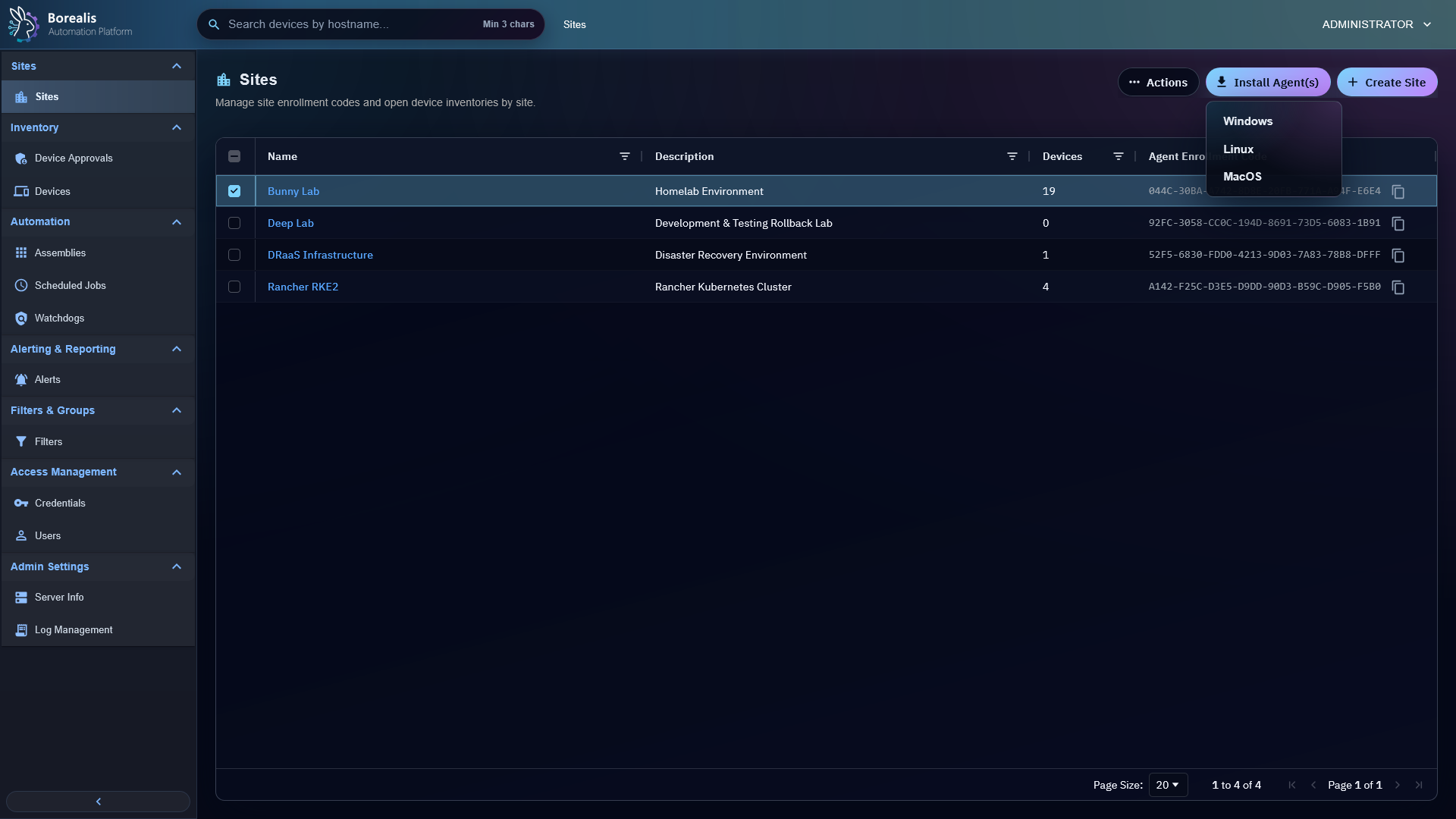
Create Site
- Open
Sites > Sites. - Select
Create Site. - Enter name and optional description.
- Save.
- Expand the site install-link drawer when deploying agents for that site.
Each site has its own enrollment code. Agent enrollment uses the selected Engine URL and site enrollment code. Internal-Only Engine enrollments also include Borealis local CA data so the Agent can validate the Engine FQDN without disabling TLS verification. Internal-Only enrollments also include an Engine IP fallback so agents without private DNS can enroll and reconnect while keeping the FQDN as the trusted HTTPS identity. Linux agents also use that fallback to start WireGuard when endpoint DNS fails.
The install-link drawer uses current Engine-compiled Agent artifact only. Engine deploys rebuild that artifact from checked-out Data/Agent source on Engine host. Links use signed, non-enumerable Engine download URLs. Agent binaries are never fetched from GitHub.
Use the download icon beside a site name to expand the in-grid install-link drawer. The drawer shows a nested Agent install-link table for Windows and Linux, including Agent type, Agent compile date, issue time, expiry, download count, and last successful download. Agent compile date is Engine artifact build time. Platform status shows whether Engine-compiled Agent link is Up-to-Date, still Compiling..., Out-of-Date, or waiting while Borealis is Sending to Site Worker.... Select Install on Windows or Install on Linux to copy that platform's full Engine download command. Platform row action can revoke that platform link. Revoke replaces only that platform link and leaves other platform link active.
Use Network-Based Device Onboarding from a site row action menu when the Engine should attempt local-network agent installation against Linux or Windows targets for that site.
Site names also feed K3s bridge site-worker pod names. Borealis strips symbols, converts whitespace to dashes, and requires the resulting worker slug to be unique and no longer than 51 characters. For example, Bunny's Lab becomes site-worker-bunnys-lab.
Assign Devices
Use site assignment actions when a device was approved without the expected site, moved between customers, or needs admin review. Devices without site assignment are admin-only.
Network-Based Device Onboarding
Use Network-Based Device Onboarding from the Sites row action menu when the Engine should attempt local-network agent installation against Linux or Windows targets.
Onboarding jobs still send agents through Device Approvals. Successful remote install means the agent reached Borealis, not that it is trusted yet.
Read Worker Resource Usage
The Sites grid shows live resource usage for each active site-worker when Engine runtime metadata is available. Docker-backed workers show CPU, RAM, NET, and DISK mini-trends. K3s bridge workers show CPU and RAM from Metrics Server through borealis-operator.
Resource mini-trends refresh with the site-worker payload every 5 seconds and keep only the last 60 seconds in the browser. On page load, Sites renders site records first, then starts worker polling immediately after the first render without blocking site names or descriptions. Site Worker Container shows Polling Site Worker Metrics and Connected Devices shows Analyzing Agent Connections until the first successful worker payload arrives. Mini-trends and connection bars display as soon as Docker stats or K3s pod metrics are available. K3s Metrics Server does not provide pod network or filesystem stats, so K3s bridge rows render CPU/RAM only. Navigating away from Sites clears that short history. Sites with no active site worker show Site Worker Not Running.
The Connected Devices bar uses the last known connected breakdown for a short grace window before showing an all-reconnecting state. This prevents one missed site-worker heartbeat or zero-connected poll from briefly making healthy sites look broken.
Select any colored section of the Connected Devices bar, or its Connected, Reconnecting, or Offline label, to open Device Inventory filtered to that site and connection status. Reconnecting means the Agent heartbeat is still reaching the Engine, but the site-worker management socket has not reattached yet.
Tip
Keep one site per customer, lab, or security boundary. Filters and scheduled jobs become easier to reason about when site scope matches real ownership.
Detailed Codex Breakdown
API endpoints
GET /api/sites- list visible sites and install-command metadata.POST /api/sites- create site.POST /api/sites/delete- delete sites.GET /api/sites/device_map- hostname-to-site map.POST /api/sites/assign- assign devices to site.POST /api/sites/rename- rename site.POST /api/sites/<site_id>/auto-approval- set or clear temporary site auto-approval.GET /api/agent/install/download/{platform}?site_id=<id>&artifact=<artifact_id>&expires=<rfc3339>&download_signature=<signature>- signed, no-session Agent binary download used by Engine-compiled site install commands. Supported platforms arewindows-amd64andlinux-amd64.POST /api/sites/{site_id}/agent-install-links/{platform}/revoke- admin-only platform link revoke. Supported platforms arewindows-amd64andlinux-amd64; the response includes replacement metadata for the same site/platform.GET /api/server/workers?history_seconds=300- active/recent worker state used by Sites, including K3s CPU/RAM pod metrics whenborealis-operatorcan read Metrics Server and legacy Docker metadata only when an explicit Docker metadata endpoint is configured during migration.
Related documentation
Source map
- Site API:
Data/Engine/Containers/api-backend/cmd/api-backend/sites.go - Agent install download API:
Data/Engine/Containers/api-backend/cmd/api-backend/agent_update.go - Sites UI:
Data/Engine/Containers/webui-frontend/data/web-interface/src/Sites/Site_List.jsx - Shared row context menu:
Data/Engine/Containers/webui-frontend/data/web-interface/src/Row_Context_Menu.jsx - Device List UI:
Data/Engine/Containers/webui-frontend/data/web-interface/src/Devices/Device_List.jsx - Site assignment UI:
Data/Engine/Containers/webui-frontend/data/web-interface/src/Sites/Site_Assignment.jsx
Runtime behavior
- Sites live in
sites. - Device membership lives in
device_sites. - Enrollment codes live on
sites.enrollment_code. - Active Engine install link state lives in
engine.site_agent_install_links. Borealis keeps one active Windows row and one active Linux row per site. Expired, revoked, or artifact-stale rows are retained for audit and replaced automatically whenGET /api/sitesbuilds install metadata. GET /api/sitesreturns install/download metadata:public_base_url,public_hostname,deployment_profile,engine_ca_required, Internal-Onlyengine_ca.pem_b64, Internal-Onlyserver_ip_fallback,agent_binary_source=engine, andagent_install_artifactwith Engine cache availability, link-state availability, build status, artifact identity, desired Agent build ID, and artifactcompiled_at. Site rows includesite_worker_slug,site_worker_name, andagent_install_downloadsfor signed per-site platform download URLs when Engine artifact is usable.- Engine deploys run
Data/Agent/build-agent.shagainst the staged source and package the resulting Windows/Linux binaries intoEngine/Services/api-backend/cache/AgentUpdates. Engine-compiled Agent artifact identity is derived from theData/Agentsource tree digest, not the broader Engine Git commit. This prevents a dirty or locally edited Agent source tree from reusing an older cached Agent binary.compiled_atis written when the deploy packages the artifact and never falls back topromoted_atorrefreshed_at. - Sites renders install-link details as a synthetic full-width AG Grid row below expanded site row. That row contains a nested two-row AG Grid for
windows-amd64andlinux-amd64; Agent type cell copies full Engine-hosted platform install command, and per-platform context action revokes current link. Platform status derives from Engine build/cache state, active link artifact identity, and current site-worker readiness. Borealis keeps one API-owned Agent cache shared through hostPath mounts, not separate binary copies per site worker.Engine.sh --redeploy-agent-binariesrotates outdated worker runtime images only after publishing that shared cache. - Agent install download URLs expose readable
site_id,artifact, andexpiresquery fields plusdownload_signature. The signature is calculated over those visible fields, platform, hiddenlink_nonce, and the current site enrollment-code hash, so changing visible fields, rotating the site enrollment code, or revoking the active link invalidates the URL. The default URL TTL is 24 hours and can be tuned withBOREALIS_AGENT_INSTALL_DOWNLOAD_TOKEN_TTL_SECONDS. - Successful signed-query binary responses increment
download_countandlast_downloaded_aton the active link row. Invalid, expired, revoked, tampered, and legacy-token requests do not increment counters. agent_update.gostill accepts the older/api/agent/install/download/{token}/{platform}shape for already-issued URLs until they expire. New Site install commands should use the readable signed-query shape, and the UI does not display legacy token URLs.POST /api/sitesandPOST /api/sites/renamereject names whose normalized K3s worker slug is empty, longer than 51 characters, or duplicates another site's slug.- Operators with no assigned sites see no normal device/site inventory unless they are admins.
- Site-worker resource usage comes from Docker stats/Docker inspect for Docker-backed workers and K3s Metrics Server podmetrics for K3s bridge workers. Sites does not fetch worker metrics from the route loader; browser polling starts immediately after the page renders and continues every 5 seconds.
- Docker rows render CPU, RAM, NET, and DISK. K3s rows render CPU/RAM only because Metrics Server does not expose pod network counters or writable-layer disk usage.
- The Connected Devices bar caches the last non-zero connected breakdown in browser state and reuses it for brief zero-connected worker polls. Sustained zero-connected payloads still render as reconnecting after the grace window.
- Connected Devices bar segments and labels deep-link to
/devices?site=<site_id>&status=<connected|disconnected|offline>. ThedisconnectedURL token is preserved for compatibility, but Device Inventory renders those API-online, socket-missing devices asReconnecting.