Server Info
Server Info is the admin dashboard for Engine runtime health. Use it to inspect service state, resources, public edge certificates, live operators, WireGuard, Aegis, timezone, WebUI route owner, and site-worker scheduled task slots.
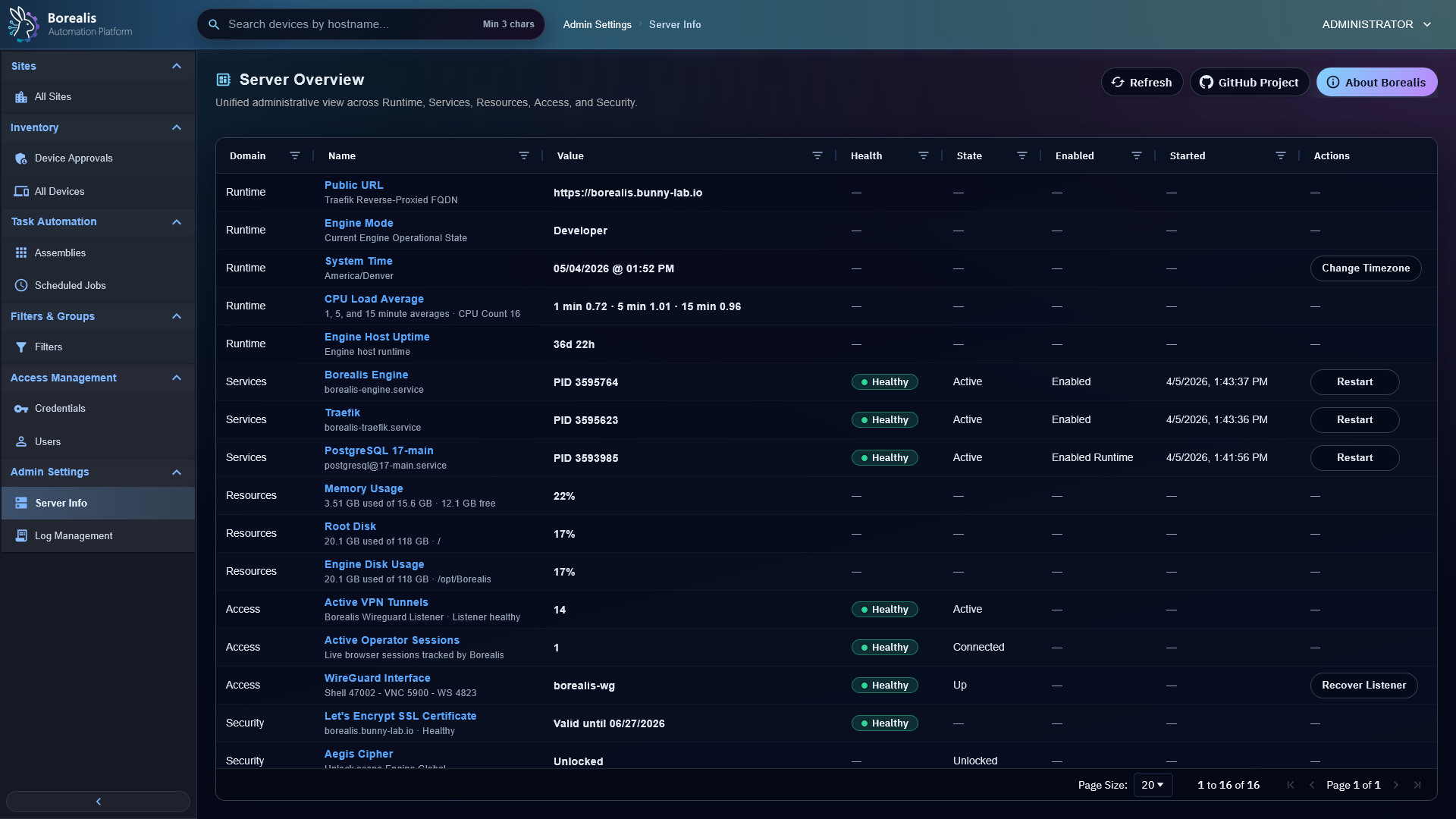
Read Overview
- Open
Admin Settings > Server Info. - Start with summary cards.
- Review runtime, service, resource, access, and security rows.
- Check edge certificate health before blaming browser or agent trust.
- Check WireGuard state before troubleshooting shell, desktop, SSH, or WinRM.
Run Service Actions
Server Info can queue supported Engine service actions through the job scheduler. K3s-owned workload actions are routed through borealis-operator; WireGuard reconcile goes through the K3s tunnel control socket. Docker Compose service-action helpers are retired after Stage 11.
Use service actions for focused restart, Traefik reload, or WireGuard reconcile work. Use Engine.sh --network-mode public|local --service webui-frontend rebuild prod|dev for WebUI rebuilds, and use full Engine deploy when more than one component changed.
Tune Runtime Settings
Server Info also shows Site Worker Scheduled Tasks as read-only profile-managed data. Engine.sh --network-mode public|local deploy tunes that value from the detected Engine sizing profile, and redeploys overwrite stale manual values.
This value is active scheduled-lane work-item capacity per site worker, not raw device concurrency. Shared Ansible batches, scheduled workflows, scheduled jobs, and agent-maintenance items each consume scheduled slots while active according to their work-item shape.
Warning
Service actions affect live Engine components. Prefer targeted actions only after identifying affected service.
Detailed Codex Breakdown
API endpoints
GET /api/server/overview- dashboard snapshot.GET /api/server/time- server clock.GET /api/server/timezones- current Engine timezone metadata. Timezone changes are handled on the host, then applied through Engine redeploy.GET /api/server/site-worker-settings- read profile-managed site-worker scheduled-lane work-item capacity.POST /api/server/services/<service_key>/action- queue container service action.POST /api/server/services/<service_key>/restart- queue systemd restart path.POST /api/server/wireguard/recover- queue WireGuard tunnel reconcile.
Related documentation
Source map
- Server API:
Data/Engine/Containers/api-backend/cmd/api-backend/server_overview.go - Server actions:
Data/Engine/Containers/api-backend/cmd/api-backend/server_actions.go - Agent artifact metadata:
Data/Engine/Containers/api-backend/cmd/api-backend/agent_artifact.go - Agent update/download API:
Data/Engine/Containers/api-backend/cmd/api-backend/agent_update.go - WireGuard recovery:
Data/Engine/Containers/api-backend/cmd/api-backend/server_wireguard.go - Log API:
Data/Engine/Containers/api-backend/cmd/api-backend/server_logs.go - Server Info UI:
Data/Engine/Containers/webui-frontend/data/web-interface/src/Admin/Server_Info.jsx - Service actions:
Data/Engine/Containers/site-worker/data/services/job_scheduler/
Runtime behavior
- Container mode reads remaining Compose bridge service state from job-scheduler snapshots and reads K3s state through
borealis-operator. - Site-worker resource and task rows live on the Sites page through
/api/server/workers; Server Info only shows profile-managed Site Worker Scheduled Tasks. - Host runtime details include
webui_traffic_ownerandwebui_upstreamso K3s WebUI cutover can be validated without reading Traefik files directly. - When
webui_traffic_ownerisk3s, the Composewebui-frontendservice row reportsenabled_state=disabledinstead of a missing or failed Compose container. - Public-edge certificate health reads Traefik
acme.jsonfor Externally Accessible deployments, or the Borealis local CA/leaf certificate files for Internal-Only deployments./api/server/overviewreports profile, certificate mode, expiry, severity, domains, resolver/source, fingerprint, and local CA bundle metadata for install flows. - Active Operator Sessions counts live
/api/realtime/eventsSSE subscribers. The realtime hub emitsserver_operator_presence_changedwhen subscribers connect or disconnect so Server Info can refresh without waiting for the next poll. - Service actions queue work items so API request can return before service changes interrupt runtime. K3s-owned workload actions are reconciled through
borealis-operator; K3s WireGuard reconcile uses the mounted WireGuard control socket fromjob-scheduler. Stage 11 retires Docker/Compose service-action helpers and stale Compose service rows. - The Site Worker Scheduled Tasks value controls active scheduled-lane work items for scheduled jobs, scheduled workflows, scheduled Ansible work, and agent-maintenance work. Onboarding keeps its separate lane behavior.
- Shared Ansible batches consume one scheduled slot for a site batch even when the batch targets several devices. Individual Ansible runs consume one scheduled slot per one-target run while active.
- Agent source selection does not live in Server Info. Full Engine deploys build current
Data/Agentsource, package one artifact underEngine/Services/api-backend/cache/AgentUpdates/<artifact_id>.zip, and writeEngine/Services/api-backend/config/agent_artifact.json. - Runtime install downloads are non-enumerable signed URLs generated from current Engine artifact, site enrollment-code hash, artifact ID, platform, and visible
expiresquery value. Rotating a site enrollment code invalidates outstanding install download URLs for that site. - Server Info is informational first; raw log inspection belongs in CLI-driven Engine Log Access.
- Legacy
/engine-statusURLs redirect to/server; the old Engine Status React Flow page was retired.